Web App vs. Native App: Which Is Better for Museum Audio Guides?
Frequently Asked Questions
Should a museum audio guide be a web app or a native app?
For most museums, a web app is the better choice. It removes the download barrier that kills adoption — visitors scan a QR code and start immediately, with no app store visit, no account creation, no storage concerns. Native apps only make sense for major institutions with strong brand apps that visitors download before arriving.
What is a PWA and can it work for museum audio guides?
A Progressive Web App is a web app that can be installed to a phone's home screen, work offline, and send push notifications. It gives museums most of the benefits of a native app — including offline support and an app-like experience — without requiring visitors to visit an app store.
Do museum visitors actually download audio guide apps?
Most don't. Requiring an app download before a museum visit cuts adoption significantly — estimates suggest 60-70% of potential users won't bother. Visitors see a single-use app as not worth the storage space and setup time. Web-based guides that work instantly via QR code consistently see higher usage rates.
Can web-based audio guides work offline in museums with poor Wi-Fi?
Yes. Modern web technologies like service workers allow web apps to cache content for offline use. While native apps historically had stronger offline support, the gap has closed substantially. PWA-based audio guides can pre-download tour content after the initial load and function without a connection.
A visitor walks into your museum. There's a QR code on the wall advertising your audio guide. They scan it. Their phone opens the app store. The app is 87 MB. They're on mobile data. They look at the download progress bar, look at the gallery in front of them, and put their phone away.
You just lost that visitor. The content was fine. You just put a door between them and the experience.
That's the web vs. native debate for museum audio guides, and it's not really close. For the vast majority of museums, a web app is the right call. But the reasons go beyond the download issue, and there are real cases where native apps still make sense.
The download barrier isn't theoretical
Museum professionals sometimes underestimate how much friction an app download creates. If you work in museums, you use your audio guide app all the time, so of course it's on your phone. But your visitors are not you.
A typical museum visitor will use your audio guide exactly once. Maybe twice if they return in a year. Asking them to download a dedicated app for that single use is asking a lot. They need free storage on their phone. They need either Wi-Fi or enough mobile data. They need an app store account. They need to wait for the download and installation. Then they need to open the app, possibly create an account within it, and figure out how to start the tour.
Each of those steps loses people. Industry data suggests that requiring a native app download reduces potential audio guide adoption by 60-70%. That's not a rounding error. If your guide could reach 25% of visitors through instant web access, a native app requirement might drop that to 8-10%.
The math is simple. A slightly better native experience reaching 10% of visitors versus a web experience reaching 25%. For most museums, reach wins.
What web apps actually give you
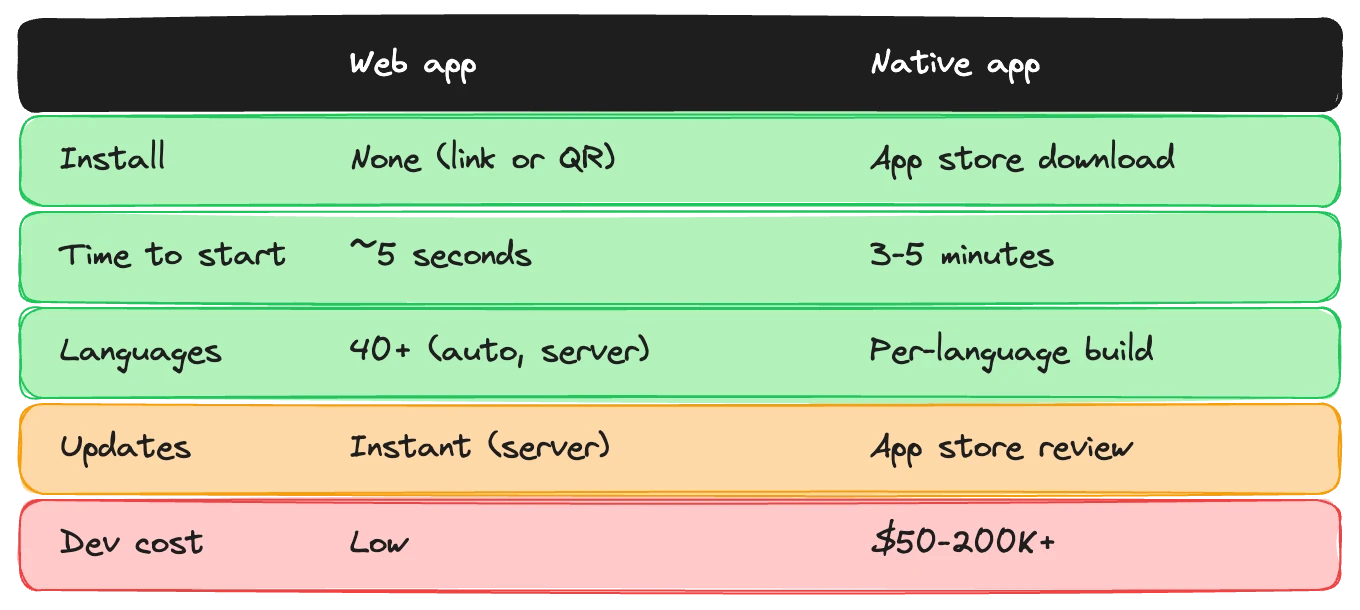
A web-based audio guide works like this: visitor scans a QR code (or taps a link on your website), and the guide opens in their browser. No download. No account. No app store. They're listening within seconds.
That's the headline benefit, but it's not the only one.
Universal device support. A web app runs on any smartphone with a browser, whether it's iOS, Android, old, or new. You don't need to maintain two separate codebases or worry about which Android version you support. One URL works everywhere.
Instant updates. When you change content (new temporary exhibition, updated tour, corrected information) every visitor gets the latest version immediately. No app update to push, no approval process from Apple or Google, no visitors stuck on outdated versions because they haven't updated.
No app store politics. Publishing and maintaining an app in the Apple App Store and Google Play requires developer accounts, review processes, compliance with changing policies, and ongoing maintenance. For a museum, this is overhead that doesn't improve the visitor experience.
Lower development cost. One web app versus two native apps (iOS and Android) is roughly half the development effort for initial build and ongoing maintenance. That's money you can put into content instead.
Discoverability from your website. A web-based guide can be linked directly from your "Plan Your Visit" page. Visitors can preview it before arriving, start it from home, or bookmark it. A native app requires them to find it in an app store, and app stores are crowded.
Where native apps still win
To be fair: native apps do some things that web apps historically couldn't. The gap is narrower than it was five years ago, but it exists.
Offline reliability. Native apps can download all content to the device and function with zero connectivity. This matters for heritage sites with no Wi-Fi, thick-walled buildings that block signals, or underground spaces. Web apps can work offline too (more on that below), but native apps have had this capability longer and it's more battle-tested.
Push notifications. A native app can send notifications after the visit: "Rate your experience," "New exhibition opening next month," "Your favorite artist has a new show." This only matters if you're building a long-term relationship with repeat visitors, which is realistic for major institutions but less so for most museums.
Device hardware access. Certain features (advanced AR overlays, Bluetooth beacon integration for precise indoor positioning, background audio that persists when the phone locks) work more reliably in native apps. If your guide depends on AR experiences layered over physical exhibits, native gives you more control.
App store presence. For museums with strong brands, being in the app store is a discovery channel. A visitor planning a trip to the Louvre or the Met might search the app store as part of their planning. Smaller institutions don't benefit from this. Nobody searches "Smalltown Heritage Museum" in the App Store.
These are real advantages. They're just not relevant for most museum use cases. The typical audio guide needs to play audio, show text, display images, and respond to user interaction. Web apps handle all of that without issue.
The PWA middle ground
Progressive Web Apps blur the line between web and native. A PWA is a web app that behaves like a native app in specific ways: it can be installed to the home screen, work offline, send notifications, and access device features, all while still being delivered through a URL with no app store involved.
For museum audio guides, PWAs are a strong option. The visitor's first interaction is zero-friction: scan the QR code, the guide opens instantly in the browser. If they like it and want to keep it, they can "install" it to their home screen with a single tap. From that point, it looks and feels like a native app.
The offline story is the most relevant part. A well-built PWA can use service workers to cache tour content after the initial load. The visitor starts with a connection, the content downloads in the background, and the rest of the tour works without one. This covers the most common offline scenario (spotty Wi-Fi within a building) and handles the heritage site use case reasonably well.
PWAs can also send push notifications on Android and, as of recent iOS updates, on iPhones too. The last major gap between PWAs and native apps is closing.
The adoption math
This is where the decision should start for most museums. Not with technical capabilities, but with adoption.
Suppose your museum gets 200,000 visitors per year. With a web-based guide and decent promotion, you might see 20-25% adoption, so call it 45,000 guided visits. With a native app requirement, optimistically 8-10%, maybe 18,000 guided visits. That's 27,000 fewer people experiencing your interpretation each year.
Those 27,000 people didn't reject your content. They rejected the friction. They would have used the guide if it had been easier to access.
Now factor in the visitor who's already inside the museum when they decide to try the guide. Maybe they overheard someone else using it, or they noticed a QR code next to an interesting piece. With a web app, that impulse leads to immediate action: scan and listen. With a native app, that impulse hits a wall. Download, install, open, set up. The moment is gone.
Impulse usage is a significant driver for audio guide adoption, and web apps are the only delivery method that captures it.
When native actually makes sense
For a small number of institutions, native apps are the right choice. The criteria are specific:
You have a strong brand that visitors plan around. If people Google your museum and download your app as part of trip planning, before they arrive, the download barrier matters less. This applies to top-tier institutions that draw destination visitors: people who are traveling specifically to visit your museum and will spend half a day there.
Your guide is part of a larger app ecosystem. If your app includes ticketing, membership, event booking, and a gift shop, and the audio guide is one feature among many, a native app makes sense because the visitor has multiple reasons to keep it installed. The audio guide alone doesn't justify an app, but the whole package might.
Your experience depends on hardware features. If the audio guide is built around AR experiences that need full camera and motion sensor access, or if indoor positioning via Bluetooth beacons is central to the experience, native apps currently offer more reliable access to those capabilities.
If none of these apply to you, and for the majority of museums they don't, web is the better path.
How Musa approached this
We went web-only from the start. Not as a compromise, but as a deliberate choice.
Visitors scan a QR code and the AI audio guide opens. No download, no account, no setup. They're hearing the first stop within seconds of scanning. That speed, from "I'm curious" to "I'm listening," is the single biggest factor in adoption, and it shaped the entire product decision.
Being web-based also means we can put QR codes everywhere: next to exhibits, at the entrance, on tickets, on the website, in marketing materials. Each one is a direct entry point to the guide. No "download our app first" asterisk.
The tradeoffs we accepted were real. Offline support requires more engineering effort in a web context than in a native app. Certain device features need workarounds. We can't send push notifications to visitors who don't install the PWA (and most won't). We made peace with those tradeoffs because the alternative, losing the majority of potential users to a download screen, was worse.
Technical considerations if you're deciding now
Some practical factors to weigh:
Offline support. If your site has reliable Wi-Fi, this is a non-issue. If it doesn't, you need a strategy. PWA service workers can cache content after initial load, which works for patchy connectivity. For sites with zero connectivity (underground tunnels, remote heritage sites), native apps still have an edge, though PWAs are narrowing the gap. Think about what "offline" actually means in your context. Most museums have at least enough connectivity for a progressive download approach.
Audio playback. Both web and native handle audio well. Web apps occasionally have quirks with background audio on iOS (audio pausing when the screen locks), but these are solvable with the right implementation. Test on actual visitor devices, not just your team's phones.
QR code to guide speed. Measure this. From the moment a visitor scans the QR code to the moment they hear the first word of narration. For a web app, this should be under 10 seconds. For a native app on a phone that doesn't have it installed, it's minutes. That difference determines whether the visitor stays engaged or gives up.
Maintenance burden. A web app needs one codebase maintained. A native strategy means maintaining iOS and Android builds, dealing with OS version updates, managing app store listings, and handling the review process for every update. For most museum teams, which don't have dedicated mobile developers, the web approach is dramatically simpler.
The trajectory
Web capabilities keep expanding. Five years ago, web apps couldn't work offline, couldn't send push notifications, couldn't access the camera. Now they can do all three. The remaining native-only features (advanced AR, certain Bluetooth protocols, deep OS integrations) are on the standards track and will arrive in browsers over the next few years.
The trend line matters because an audio guide is a long-term investment. Choosing web today means you benefit from every browser capability that ships tomorrow, automatically. Choosing native means you're locked into app store economics and dual-platform maintenance for the life of the product.
For most museums, the question isn't whether web apps are technically good enough. They are. The question is whether you can afford to lose 60-70% of potential users to a download screen. For a handful of world-famous institutions with strong app ecosystems, that tradeoff might work. For everyone else, it doesn't.
If you're evaluating delivery options for your audio guide and want to talk through how this applies to your specific situation, reach out.