BYOD stands for Bring Your Own Device. Instead of handing visitors a dedicated audio guide player, you let them use their own smartphones. Visitors scan a QR code or open a link, and the guide runs on their phone — no app download required with web-based solutions.
What percentage of museum visitors have smartphones?
Smartphone penetration in typical museum-visiting demographics exceeds 85% in most Western countries, and it's higher among younger visitors. For the small percentage without a phone, museums can maintain a small loaner pool at a fraction of the cost of a full device fleet.
How much does a BYOD audio guide cost compared to dedicated devices?
A dedicated device fleet typically costs 40,000-120,000 upfront for hardware, content, and setup, plus ongoing maintenance. BYOD eliminates the hardware line entirely. Web-based BYOD guides can run on usage-based pricing with near-zero upfront cost — the savings are structural, not incremental.
Are there hygiene concerns with shared audio guide devices?
Yes. Post-COVID, visitors are less willing to hold a device hundreds of other people have used that day. BYOD sidesteps this entirely — visitors use their own phone and their own headphones. No sanitization process needed.
Every museum visitor walks in carrying a computer more powerful than any dedicated audio guide device ever manufactured. It has a high-resolution screen, multiple speakers, Bluetooth for their headphones, cellular data, and an operating system they already know how to use.
Then the museum hands them a scratched-up plastic brick from 2017 and asks for a deposit.
This is the state of dedicated hardware audio guides. The devices are expensive to buy, expensive to maintain, and worse in every measurable way than what's already in the visitor's pocket. The case for BYOD (letting visitors use their own phones) isn't close. It's a mismatch that persists mostly through institutional inertia and long procurement cycles.
What dedicated hardware actually costs you
The sticker price of a device fleet gets attention during procurement, but it's the smaller part of the total burden. The operational overhead is what grinds.
Procurement. Fifty to a hundred devices at $200-400 each. That's $10,000-40,000 just for the hardware, before you've created a single second of content. And those devices depreciate. In four to six years you're buying them again.
Charging infrastructure. Every device needs to be charged nightly. That means charging stations, organized storage, cables, and someone whose job includes plugging in a hundred devices each evening and confirming they're ready each morning. It's boring, repetitive, and surprisingly time-consuming.
The distribution desk. Someone stands behind a counter handing out devices, explaining how they work, taking deposits, and collecting returns. At busy museums this requires a dedicated staffer. At smaller ones it pulls reception away from actually welcoming visitors.
Theft and damage. Devices walk out the door. They get dropped. Kids chew on them. Budget 5-15% annual attrition on a fleet worth tens of thousands. That's a quiet, persistent expense that never stops.
Sanitization. After COVID, wiping down shared devices between uses became expected. Some museums staffed this. Others bought UV sanitization cabinets. Either way, it's a cost and a workflow that didn't exist before 2020 and isn't going away.
E-waste. When a device fleet hits end-of-life, you're disposing of hundreds of proprietary electronics. The environmental cost is real, and it cycles every few years.
Add it all up and a dedicated fleet runs $30,000-100,000+ just to keep operational over five years. That's before content production, which is its own line item.
Visitors already prefer their own phones
Cost is the institutional argument. But there's a visitor argument too, and it matters just as much, because a guide nobody uses is worthless regardless of what it cost.
People are attached to their phones. Not in an abstract sense. In a deeply practical one. They know where every button is. They've set their preferred font size. Their screen reader is configured. Their hearing aids are paired via Bluetooth. Their brightness is where they like it. They have their own headphones, the ones that actually fit their ears.
Hand someone a dedicated device and you strip all of that away. Now they're holding an unfamiliar piece of hardware with different controls, a screen brightness they can't adjust easily, and earbuds that someone else was wearing an hour ago. For visitors with accessibility needs, this isn't just uncomfortable. It can make the guide unusable.
With BYOD, none of this is an issue. The visitor opens a link on the phone they've been using all day. Everything works exactly the way it always does. The interface is familiar. The accessibility settings carry over. Their headphones are already in.
BYOD consistently shows higher usage rates than dedicated hardware. Fewer barriers to start, fewer reasons to stop.
The smartphone objection
The most common pushback against BYOD: "But some visitors don't have smartphones."
Fair point. Not everyone carries one. But the numbers don't support making this the deciding factor.
Smartphone penetration among adults in the US, UK, and most of Western Europe exceeds 85%. Among the demographics that visit museums most frequently (urban, educated, higher income) it's north of 90%. For visitors under 50, it's effectively universal.
That leaves a real but small population without a phone. The answer isn't to build an entire hardware infrastructure for everyone because 10% of visitors might need it. The answer is to keep a small loaner pool. Twenty or thirty basic devices for a museum that previously maintained a hundred. The cost difference is enormous. The coverage gap is minimal.
Some museums go further and stock a handful of tablets at key points in the exhibition for visitors who didn't bring a device. Others partner with their local library system to loan devices. The point is: you solve for the exception with a targeted solution, not by making the exception the default.
The experience flow changes completely
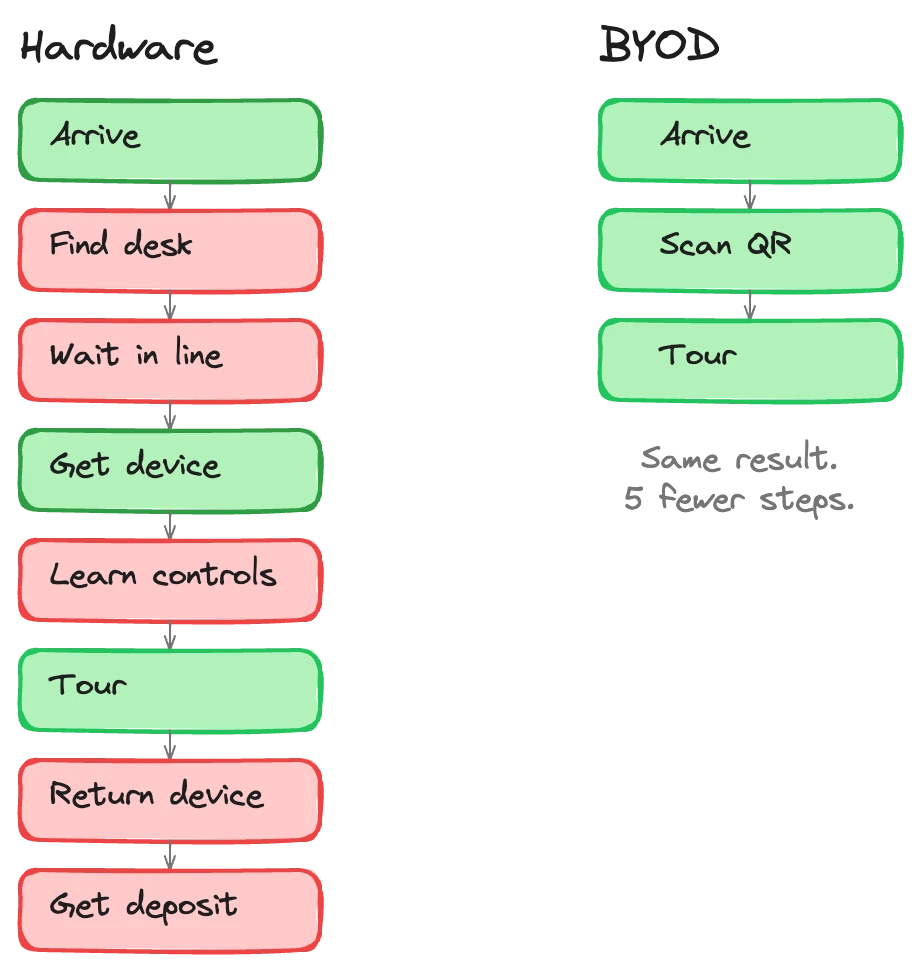
Dedicated hardware imposes a ritual. Arrive at the museum. Find the audio guide desk. Wait in line. Show ID or leave a deposit. Get a brief tutorial on the device. Figure out which number corresponds to which stop. At the end, return the device, collect your deposit, wait in another line.
BYOD eliminates every one of those steps.
The visitor walks in, sees a QR code, scans it with their phone camera, and the guide loads. No line. No desk interaction. No deposit. No tutorial: they already know how to use their phone. When they're done, they just leave. No returning anything.
This matters more than it sounds. The moments before someone enters an exhibition set the tone for their visit. Starting with a queue and a transaction is friction. Starting by scanning a code and hearing a welcome message is engagement. The guide meets visitors where they are, literally and figuratively.
For families, the difference is even starker. Try managing a hardware desk interaction with two kids pulling at your sleeves. Now compare: parent scans a QR code while walking through the door. Done.
Accessibility without extra work
Dedicated devices have a fixed set of accessibility features, whatever the manufacturer included. If a visitor needs larger text, a specific screen reader behavior, or hearing aid streaming, they're dependent on whether that particular device supports it.
With BYOD, accessibility is already handled. iOS and Android have spent billions of dollars on accessibility features. VoiceOver, TalkBack, font scaling, color inversion, hearing aid protocols, switch control: these are built into the phone the visitor already owns and has already configured.
A web-based BYOD guide inherits all of it automatically. A visitor who uses VoiceOver at home uses VoiceOver in your museum. A visitor with a Bluetooth hearing aid streams the guide audio directly, same as they stream phone calls. No setup. No special request at the desk. No hoping the museum's devices support their specific need.
We've had feedback from visitors with low vision who said they'd never been able to use a museum audio guide before BYOD, because the dedicated devices had fixed font sizes and no screen reader support. Their own phone just works.
Battery, data, and headphones
Three practical concerns come up whenever BYOD is discussed. All three have straightforward answers.
Battery life. A modern smartphone lasts an average museum visit without issue. The typical visit is 60-90 minutes. Audio streaming uses minimal battery, comparable to listening to a podcast. For institutions with longer visit durations (large museums, outdoor heritage sites with multi-hour walks), offering a few charging stations handles the edge case. That's cheaper than a hundred charging cradles for dedicated devices.
Data usage. Audio streaming is lightweight. A full museum visit might use 50-100MB of data, roughly equivalent to scrolling social media for fifteen minutes. Most visitors have sufficient data. For those on limited plans or international visitors avoiding roaming, museum Wi-Fi covers it. Many museums already offer Wi-Fi; this just gives it another reason to exist.
Headphones. Most visitors already have headphones in their pocket, in their bag, around their neck. For those who don't, offering cheap disposable earbuds at cost (or free) solves it. A box of disposable earbuds costs less per month than maintaining a single dedicated audio guide device for a year.
The data advantage
BYOD generates better data.
With dedicated devices, your analytics are limited to what the device firmware tracks. Usually that means which stops were played and for how long. Basic. Not much you can do with it.
A web-based BYOD guide runs in a browser. You can track engagement patterns, navigation paths, where visitors pause, where they skip, which languages are most requested, how long sessions last, and (with conversational AI guides) what questions visitors actually ask. It's a fundamentally richer dataset.
A museum using Musa's BYOD platform can see that visitors spend three times longer at one exhibit than another, that Spanish-speaking visitors consistently ask about a specific historical event, or that most visitors skip the fourth floor entirely. That's usable intelligence. It tells you where to invest in interpretation, where to improve signage, what your next temporary exhibition should cover.
Dedicated devices can't give you this. They give you play counts.
When BYOD doesn't work (and what to do about it)
BYOD isn't perfect for every scenario. The limitations are worth knowing.
Very low connectivity environments. Some heritage sites, underground spaces, or rural museums have no Wi-Fi and poor cellular coverage. A web-based guide needs some connection. Offline-capable BYOD solutions exist (including Musa's, which lets visitors download content after an initial QR scan), but they require more upfront engineering than a fully online approach.
Visitor demographics skewed very old. If your visitor base is primarily over 75, smartphone penetration drops. A historic house popular with retiree coach tours might genuinely need more loaner devices than a contemporary art gallery.
Security-sensitive environments. Some sites restrict phone use: military museums, certain government buildings. Hardware guides are the only option there.
These are real constraints. They affect a minority of institutions. For the vast majority of museums, galleries, heritage sites, and cultural venues, BYOD is the better path.
Musa is built for this
We built Musa as a BYOD-first platform because the logic pointed one direction and we followed it.
No app download. No account creation. Visitors scan a QR code and the audio guide loads as a web app on their phone. Works on any smartphone with a browser, which is every smartphone. The tour runs in the browser with the visitor's own accessibility settings, their own headphones, their own screen.
The museum doesn't buy devices. Doesn't charge devices. Doesn't staff a desk. Doesn't sanitize hardware. Doesn't replace a fleet every five years. The entire hardware line item disappears from the budget.
What's left is the thing that actually matters: the quality of the guide itself. Whether visitors learn something, feel something, stay longer, come back, tell someone about it. That's where the investment should go, not into plastic boxes that sit in charging cradles overnight.
If you're evaluating audio guide options and want to understand how BYOD would work at your institution, we can walk through the specifics. The math usually speaks for itself.