How long does it take to integrate an audio guide with existing museum systems?
With an API-first vendor, a working integration can be built in about a week, tested in the second week, and production-ready by week three. This timeline depends on the complexity of your existing systems and how cooperative their APIs are, but three weeks is realistic for most standard integrations.
Can an audio guide connect to my museum's ticketing system?
Yes. The most common integration is linking ticket purchases to audio guide access so visitors get the guide automatically when they buy a ticket. This eliminates the separate step of downloading or activating the guide and significantly improves adoption rates.
What should I ask my IT team before starting an audio guide integration?
Start with: do our current systems have APIs? Who controls those APIs, us or the vendor? Are there rate limits or access restrictions? What data format do they use? And who internally has the authority and access to set up API credentials? These questions surface blockers early.
Does integrating an audio guide with museum systems cost extra?
It depends on the vendor. Some charge for integration work as a professional services add-on. At Musa, integration support is currently included at no extra cost and happens alongside the pilot period, so there's no separate project or timeline to manage.
Most museum audio guides live on an island. The ticketing system doesn't know the audio guide exists. The collection management system holds all the content but none of it flows to the guide. The analytics platform tracks website visits and ticket sales but has a blind spot where the audio guide should be. The visitor buys a ticket, walks in, and has to discover, access, and set up the audio guide as a completely separate step.
This fragmentation isn't a technology problem. It's an integration problem. The systems exist. They just don't talk to each other.
Why this matters more than it seems
A disconnected audio guide creates friction at every stage of the visitor journey. The visitor buys a ticket online with no mention of the guide. They arrive at the museum. Maybe there's a QR code sign, maybe not. They scan it, the guide loads, they're asked to pick a tour. Meanwhile, the museum has no idea this is the same person who bought a ticket twenty minutes ago. The visitor data sits in three different systems, none of them connected.
That costs you adoption.
Every extra step between "I have a ticket" and "I'm using the guide" loses visitors. We've seen this repeatedly. A museum with a free audio guide and decent content still hits single-digit adoption rates because the access path has too much friction. The guide is technically available. It just isn't integrated into the flow that visitors are already in.
The fix isn't better signage. It's plumbing.
The dream scenario
Good integration looks like this from a visitor's perspective.
A visitor buys a ticket on the museum's website. The confirmation email includes a link to the audio guide, personalized to their language preference, which the ticketing system already captured. They arrive at the museum, tap the link, and the guide is ready. No account creation, no QR scanning, no separate app download. The guide knows which exhibition they have access to because the ticketing system told it.
During the visit, the guide pulls content from the museum's collection management system, so everything is current. If a gallery closed for renovation last week, the guide doesn't send visitors there. If a new temporary exhibition opened, it's already available.
After the visit, the analytics platform combines ticket data with guide engagement data. The museum can see not just "this visitor came on Tuesday" but "this visitor spent 40 minutes with the guide, engaged deeply with the ceramics gallery, and asked about the artist residency programme." That's a fundamentally different picture of your visitor than ticket sales alone can provide.
None of this requires exotic technology. It requires that the audio guide has an API and that someone connects it to the other systems.
Common integration points
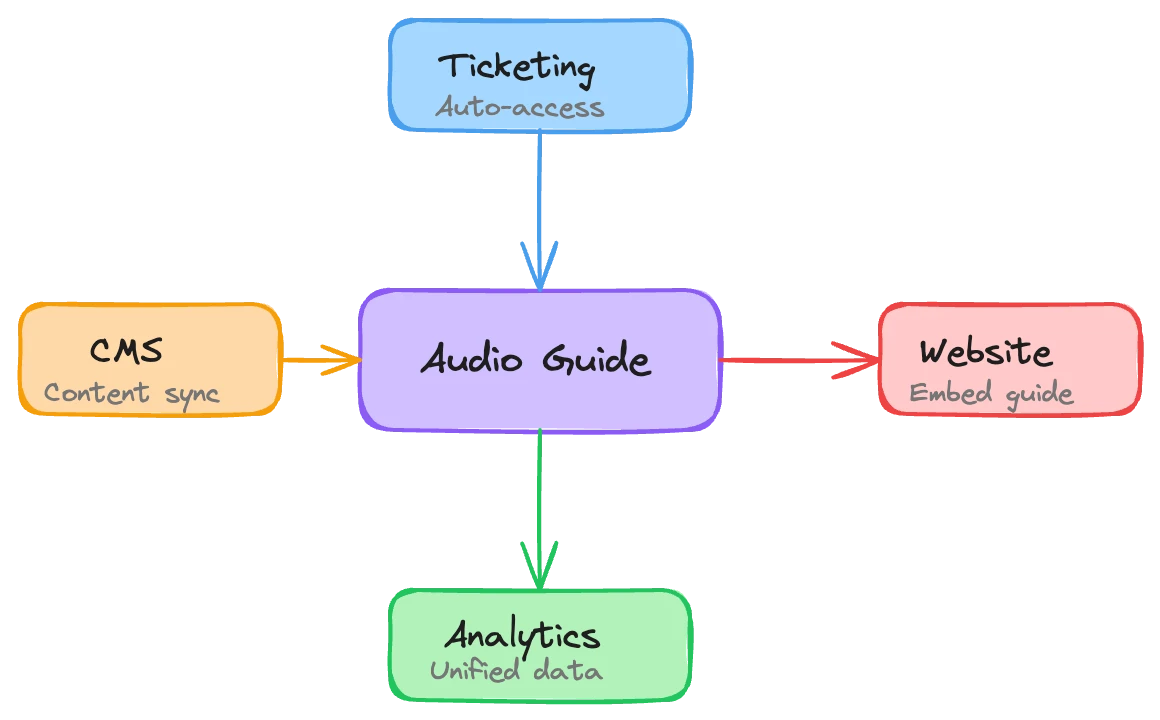
Four connections cover most of what museums need. Not every museum needs all four on day one, but knowing what's possible helps you plan.
Ticketing systems. This is the highest-impact integration. When ticket purchase triggers audio guide access, the separate activation step disappears. The visitor flow goes from buy-ticket-then-separately-discover-guide to buy-ticket-and-guide-is-ready. Some implementations include the guide as part of every ticket. Others offer it as an add-on during checkout. Either way, the ticketing system handles the distribution, which is what it's already designed to do.
Collection management systems. Your CMS holds the definitive information about your collection: object metadata, curatorial descriptions, provenance records, conservation notes, images. A good integration syncs relevant content to the audio guide so curators manage everything in one place. No duplicate data entry. No "the audio guide says the painting is from 1892 but the wall label says 1894." When the CMS updates, the guide updates.
Your website. The simplest integration and often the most overlooked. Embed guide access on your visit-planning page. Let potential visitors preview a tour before they arrive. Link from exhibition pages directly into the relevant guide content. Your website is where most visitors plan their trip. If the audio guide isn't there, it doesn't exist yet in their mental model of the visit.
Analytics platforms. Visitor data from the audio guide (engagement patterns, language usage, popular stops, content gaps) is most valuable when combined with other data sources. Feeding guide analytics into your existing platform alongside ticketing data, website analytics, and visitor surveys gives you a unified picture. Separate dashboards mean separate insights that never get compared.
What to look for in a vendor
Not all audio guide platforms are built for integration. Some are closed systems designed to own the entire visitor experience end to end. Others expose APIs but haven't invested in making them practical. A few things separate the two.
API-first architecture. The vendor should have documented APIs for the things you'd want to connect: visitor sessions, content management, analytics data, access control. If their answer to "can we integrate with our ticketing system?" is "we'll need to scope a custom project," that's a flag. Standard integrations shouldn't require custom engineering from the vendor's side every time.
Flexible data formats. Your collection management system exports data in a specific format. Your ticketing system sends webhooks in another. The audio guide needs to work with what your existing systems produce, not demand that everything conforms to its own schema. Ask how they handle data ingestion from third-party systems. If the answer involves a lot of manual formatting, you'll be doing that work every time something changes.
Authentication that plays well with others. If your museum uses single sign-on for staff tools, the audio guide's management interface should support it. On the visitor side, the guide should accept identity tokens from your ticketing system rather than forcing visitors to create a separate account. Visitor identity across systems is what makes the dream scenario possible.
Track record with your specific systems. A vendor that's already integrated with Tessitura, Axiell, or whatever your museum runs will move faster than one figuring it out for the first time. Ask for specifics. Which systems have they connected to before? How long did it take? What broke?
How integration actually works in practice
At Musa, we've deliberately built the system to be flexible about how it connects to other software. This matters because no two museums have the same technology stack. A mid-size contemporary art museum running Tessitura for ticketing and TMS for collections has completely different needs from a heritage site using an off-the-shelf WordPress booking plugin.
Our typical integration timeline: a working MVP integration in the first week, testing and edge-case handling in week two, production-ready by week three. This happens during the pilot period, running alongside the content and product work, so there's no separate integration project eating up months on your IT team's roadmap.
The integrations we build most often follow the same four patterns described above. Ticketing connections are the most requested because the adoption impact is immediate and visible. Collection management syncs are the most technically interesting because every CMS has its own data model and quirks. Website embeds are the fastest to implement. Analytics integrations take the longest to show value, but they compound. Three months of combined data tells you things neither system could reveal alone.
We currently offer integration work at no additional cost. Our reasoning is practical: an integrated audio guide performs better, gets higher adoption, generates more useful data, and creates a better experience. Charging extra for the thing that makes everything else work better doesn't make sense to us.
Questions to ask your IT team before you start
Integration projects stall when they hit surprises. Most surprises come from not understanding the current state of your systems before starting. These are the things to find out early.
Do our current systems have APIs? Not "do they claim to support integrations," but do they have actual, documented, accessible APIs? Some enterprise museum software technically has an API that hasn't been updated since 2017 and requires a vendor support ticket to activate. That's a different situation from a modern REST API with good documentation.
Who controls API access? In some museums, the ticketing system API is controlled by the vendor and requires their involvement to set up credentials. In others, it's managed internally. Know which you're dealing with, because vendor-controlled access adds a third party to your integration timeline.
What are the data constraints? Rate limits, payload size restrictions, authentication token expiration, data retention policies. These sound like technical details your IT team handles, but they shape what's possible. If your CMS API rate-limits to 100 requests per hour, real-time content sync isn't happening. You'll need batch updates instead.
What data already flows between systems? Your museum might already have integrations you're not aware of. Maybe the ticketing system feeds visitor counts to a reporting tool, or the website pulls exhibition data from the CMS. Understanding existing data flows tells you where the audio guide can plug into infrastructure that already works, rather than building from scratch.
Who has the access and authority to set things up? The person who wants the integration and the person who can create API credentials are rarely the same person. Identify your internal stakeholders early. A single missing approval or credential can stall an otherwise-ready integration for weeks.
Single sign-on and visitor identity
This one deserves its own section because it changes the nature of what's possible.
When the audio guide knows who the visitor is (not their name, necessarily, but their ticket type, language, previous visits, accessibility needs) it can do things that an anonymous guide can't. Show them content relevant to their ticket tier. Resume where they left off if they visited last month. Skip the language selection step because the ticketing system already captured it.
On the staff side, single sign-on means curators and content managers access the audio guide tools with their existing museum credentials. No separate password. No "I forgot my login to the audio guide system." This sounds minor, but it's the kind of friction that determines whether staff actually use the tools or just let them gather dust.
The technical pattern here is straightforward: your ticketing or identity system issues a token, the audio guide accepts it, and both systems agree on what it means. The hard part is usually organizational, not technical. Someone has to decide what visitor data the audio guide should receive, what it should store, and what privacy policies apply. Get your data protection officer involved early if you have one.
Start small, expand later
You don't need all four integration points on day one. In fact, trying to do everything at once is the most common way integration projects fail. Too many systems, too many stakeholders, too many things that can break.
Pick the one that solves your biggest problem. If adoption is low, start with ticketing integration. Making the guide automatic with ticket purchase will move the needle more than anything else. If content freshness is the issue, start with CMS sync. If you're building a case for investment and need data, start with analytics.
Get one integration working, prove the value, then expand. The second integration is always faster than the first because the patterns are established, the stakeholders know each other, and your IT team understands how the audio guide's API works.